Monday, June 23, 2008

Live Popularity Of Enterprise Portal Server Market by Google Keword Search using Yahoo Pipes

I just came across this interesting mashup kind of a tool called Yahoo Pipes an interactive feed aggregator and manipulator. I was thinking to use the pipes to build something relevant to my websphere blog and then decided to build a pipe which basically plot a enterpise portal popularity graph based on the total number of realtime google search results returned for each of the popular portal servers names like WebSphere Portal, Weblogic Portal, Sun One, Sharepoint, Jboss and Oracle. You can see the source of the pipe here http://pipes.yahoo.com/pipes/pipe.edit?_id=269ed254b3df0a7426e34187c98c0d17 The results also kind of confirmed the truth with this news that IBM WebSphere Portal is the leader in Enterprise portal market.

If you are not seeing the graph below please click here , because it seems like google search blocks yahoo pipes for making repeated calls, you will see the graph snapshot that was taken on July 13th 2008.


Sunday, June 15, 2008

IBM HTTP Server child process core dumps

IBM HTTP Server child process core dumps failing to serve some or all of the requests. You might see the following Segmentation fault errors in the error.log of the server.

[Sun Feb 10 19:26:52 2008] [notice] IBM_HTTP_Server/6.1.0.9 Apache/2.0.47 (Unix) configured -- resuming normal operations
[Sun Feb 10 19:26:52 2008] [notice] CoreDumpDirectory not set; core dumps may not be written for child process crashes
[Sun Feb 10 19:27:20 2008] [notice] child pid 7755 exit signal Segmentation fault (11)
[Sun Feb 10 19:27:21 2008] [notice] child pid 7756 exit signal Segmentation fault (11)
[Sun Feb 10 19:27:23 2008] [notice] child pid 7758 exit signal Segmentation fault (11)
[Sun Feb 10 19:27:25 2008] [notice] child pid 7759 exit signal Segmentation fault (11)
[Sun Feb 10 19:27:26 2008] [notice] child pid 7760 exit signal Segmentation fault (11)
[Sun Feb 10 19:27:27 2008] [notice] child pid 7761 exit signal Segmentation fault (11)
[Sun Feb 10 19:27:37 2008] [notice] child pid 7762 exit signal Segmentation fault (11)
[Sun Feb 10 19:29:36 2008] [notice] child pid 7763 exit signal Segmentation fault (11)
[Sun Feb 10 19:29:49 2008] [notice] child pid 7771 exit signal Segmentation fault (11)
[Sun Feb 10 19:30:21 2008] [notice] child pid 7772 exit signal Segmentation fault (11)
[Sun Feb 10 19:30:27 2008] [notice] child pid 7773 exit signal Segmentation fault (11)
[Sun Feb 10 20:12:12 2008] [notice] child pid 8056 exit signal Segmentation fault (11)

In our case the problem appears to be that we had mistakenly specified the ResponseChunkSize value that is too high like 400000. This value is the number of 1024 byte pages so it is multipled by 1024 which exceeds an acceptable value. so setting it to a lower value of 4000 seems to have resolved the issue. It took several days before we could figure out the issue after working with IBM, and these are following steps you can do that might help debugging the issue if in your case is not related to the ResponseChunkSize.

Please do the following:

1. To set up system to obtain cores:

http://publib.boulder.ibm.com/httpserv/ihsdiag/coredumps.html

2. Make sure you have latest IHSDIAG for debugging IHS issues.

http://www-1.ibm.com/support/docview.wss?uid=swg24008409

3. Run IHSDIAG against core that is obtained:

http://publib.boulder.ibm.com/httpserv/ihsdiag/gather_crash_doc.html

4. Run IHSDIAG against good system to get system information:

http://publib.boulder.ibm.com/httpserv/ihsdiag/describeconfig.html

Saturday, June 14, 2008

Finding websites running WebSphere Portal

I used to wonder which websites or companies are using IBM WebSphere Portal Server. The easiest way to find them is to do a Google search on /wps/portal keyword which is nothing but the default context root or the base url for WebSphere Portal. I was surprised to see several websites ranging from government websites of different countries, banks, retail, telecom etc. The search should return all websites running websphere portal with default context root /wps/portal unless they have changed it using modify-servlet-path task which i believe atleast 80%-90% of installation wouldn't have done.

Sunday, June 8, 2008

OutOfMemory errors with WebSphere Portal

WebSphere Portal server might throw OutOfMemory (OOM) errors and might got hung and unresponsive when serving or dowloading large documents through WCM (IBM Workplace Web Content Management ) which are stored in PDM (Portal Document Manager). You might see the following error in SystemErr.log and the JVM might have produced a heapdump,


[5/14/08 14:35:32:984 PDT] 00000086 ModuleManager E IWKCT1382X: Major exception caught: com.presence.connect.business.module.ErrorExecutingRequestException: IWKMU1062X: Message: IWKCT1366X: Exception caught servicing a Servlet request for PDMProxy, Cause: java.lang.OutOfMemoryError
[5/14/08 14:35:32:985 PDT] 00000086 ModuleManager E IWKCT1383X: Unexpected error from Module. Details of cause to follow:
[5/14/08 14:35:32:986 PDT] 00000086 ModuleManager E
java.lang.OutOfMemoryError
at com.presence.connect.connector.content.ContentAPIConnection.getBytes(ContentAPIConnection.java(Compiled Code))
at com.presence.connect.connector.content.ContentAPIConnection.getItemContents(ContentAPIConnection.java:516)
at com.presence.connect.connector.content.ContentAPIConnector.getItemContents(ContentAPIConnector.java:216)
at com.aptrix.pluto.resource.PDMResourceUtils.createPDMMime(PDMResourceUtils.java:632)
at com.aptrix.pluto.resource.PDMResourceUtils.getPDMData(PDMResourceUtils.java:419)
at com.aptrix.pluto.resource.PDMResourceServerModule.getResourceMime(PDMResourceServerModule.java:968)
at com.aptrix.pluto.resource.PDMResourceServerModule.buildResponse(PDMResourceServerModule.java:516)
at com.aptrix.pluto.resource.PDMResourceServerModule.retrieveResource(PDMResourceServerModule.java:355)
at com.aptrix.pluto.resource.PDMResourceServerModule.process(PDMResourceServerModule.java:276)
at com.presence.connect.business.module.ModuleManager.launchBusiness(ModuleManager.java:121)
at com.presence.connect.business.module.ModuleManager.launchBusiness(ModuleManager.java:384)
at com.presence.connect.RequestExecutable.execute(RequestExecutable.java:84)
at com.presence.connect.dispatcher.Task.run(Task.java:151)
at com.presence.connect.ConnectClient.processSynchronous(ConnectClient.java:167)
at com.presence.connect.ConnectServlet.process(ConnectServlet.java:298)
at com.presence.connect.ConnectServlet.doGet(ConnectServlet.java:120)
at javax.servlet.http.HttpServlet.service(HttpServlet.java:743)
at javax.servlet.http.HttpServlet.service(HttpServlet.java:856)
at com.ibm.ws.webcontainer.servlet.ServletWrapper.service(ServletWrapper.java:1572)
at com.ibm.ws.webcontainer.servlet.ServletWrapper.handleRequest(ServletWrapper.java(Compiled Code))


In order to resolve the issue please apply the IBM recommended ifix PK66778 and tune the JVM heap size, xloratio , pCluster & kCluster based on your application needs, expected load and the optimum performance. IBM Monitoring and Diagnostic Tools for Java - Garbage Collection and Memory Visualizer (GCMV) which is a part of IBM Support Assistant Tools can help you tune these parameters based on the Garbage Collection logs history.

Saturday, May 31, 2008

Performance issues with 'Manage Users and Groups' portlet in WebSphere Portal

There are situations like when assigning a member to a group or creating a new member for a group, listing users for a group, etc may result in poor or slow performance or even browser timeout with the 'Manage Users and Groups' portlet. These especially happends when a large number of users in a group or large number of groups exists in the ldap server. To avoid such conditions you might want to modify these configuration parameters http://www-1.ibm.com/support/docview.wss?rs=688&ca=portall2&uid=swg21247210 of the 'Manage Users and Groups' portlet based on your needs.

Friday, May 30, 2008

Login into WebSphere Portal very slow with Sun ONE LDAP

Login into WebSphere Portal very slow with Sun ONE LDAP particularly when the user belongs to a group that has about thousands of users or more and the ldap is not providing you the capability to evaluate the group memberships from user object directly (nsRole:nsRole for SunONE directory if groups are created with Role inside SunONE ). For this case, group membership searches are performed by locating the user on the member list of groups and for some reason the search takes long time even though the attributes are indexed like uid or even the uniqueMemeber. In order to fix the problem please ask youe ldap administrator to do the following in the ldap instance,

1. create a file ldaptune.txt with the following:

dn: cn=config,cn=ldbm database,cn=plugins,cn=config
changetype: modify
replace: nsslapd-search-tune
nsslapd-search-tune: 49


2. Implement by running the below coomand:

ldapsearch -h -p -D "cn=directory manager" -w -f ldaptune.txt

3. Restart the LDAP instance

At this point, redo your search test. Search result time should be shorter. If you are still running into problems double check whether the parameter is set properly or contact Sun Support.

Info on the nsslapd-search-tune parameter can be viewed at:

http://blogs.sun.com/DirectoryManager/entry/the_truth_about_nsslapd_search

Sunday, February 10, 2008

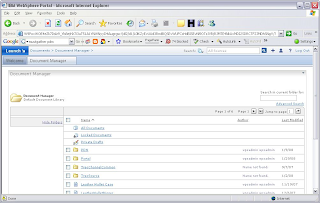
PDM portlet not working after upgrading to WPS 6.1.0.2 or WCM 6.1.0.2

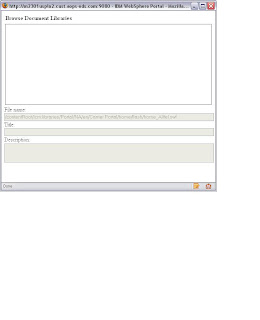
You might notice that pdm portlet (Portal Document Library ) might not function properly after upgrading to WPS 6.1.0.2 WP_PTF_6012 (IBM WebSphere Portal, Version 6.0.1.2 Fix Pack)or WCM 6.1.0.2 (WCM_PTF_6012 (Web Content Management, Version 6.0.1.2 Fix Pack), symptoms include,

1) PDM portlet will be unresponsive when you click on any of the folder strcuture and trying to navigate through it as show below.


2) The left navigation file tree view of the pdm portlet will be empty.

3) you may not able to browse the document libraries from the WCM portlet when trying to refer a document component from WCM Authoring portlet.

In order to fix the problem goto the WebSphere Adminconsole (Dmgr or AppServer)and do the following,

When the Document Manager Web module is redeployed, its groups must be mapped to the All Authenticated group in WebSphere. To map the groups, follow these steps:

Select the Document Manager application, as follows:
Expand Applications.
Select Enterprise Applications.
Locate the application that starts with Document Manager.
Click Map Security Roles to Users/Groups.
Assign the Authenticated role to the All Authenticated group.
Save your changes.
Restart the portal or sync the nodes and restart the portal cluster.
