As many of you might already know
Java VisualVM an all in one Java troubleshooting tool is available as a
JDK tool in Sun
JDK distributions starting from
JDK 6 update 7 and Apple's Java for Mac OS X 10.5 Update 4. Also
VisualVM a stand alone
separately downloadable tool is also available at
visualvm.dev.java.net. It's a visual tool enhances the capability of
performance and monitoring analysis for Java SE platform for both production and development environments. You can find more detailed information in the
VisualVM product site.
But our topic is how to make
visualvm work through SSH Tunnel specifically in production systems where it's a normal practice to allow only SSH access on port 22 for the users or
administrators, hence
visualvm will not work with the default
settings as it uses port 1099 to communicate to remote host via
jstatd. For some reason,
VisualVM doesn't seem to work through SSH Port Forwarding or SSH Proxy which seems to be a big blocker for many people which wish yo use this tool in this similar kind of setup.
The only way i came up so far to make the
VisualVM work is to use to use a system
proxifier like
WideCap (Free) or
ProxyCap (Shareware) and was able to connect to remotely a running java process over ssh proxy. Here are the steps detailing on how to configure ,
1) Download
WideCap and install.
2)Open
WideCap control panel and click on new proxy , provide
hostname as
localhost, port
8333, and select the socks version of your SSH that your client and server uses.

3)Add a new application and point to the location of java.
exe and create new rule to get triggered when the java is started.
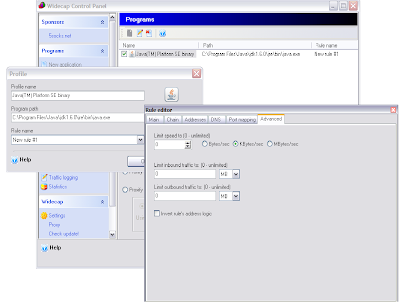
4) Enable
WideCap.
5) run putty or any ssh client as SSH proxy daemon. (e.g) putty -D 8333
username@server or ssh -D 8333
user@host6) Start
VisualVM and add remote host and now you should be able to see the java process running on the remote server and you should be able to connect and monitor.

On a cautious note that
widecap is not very consistent and it crashes outlook (
at least for me ) and IE sometimes but on the
other hand proxycap seem to work fine along with other standard windows applications without problems.
Also if you run into problems make sure all the instructions are followed in this
link




