Showing posts with label portlet. Show all posts

Wednesday, July 22, 2009

WebSphere Portal Interview Questions for an Administrator


List of interview questions that i might ask someone for the job of WebSphere Portal Server Administrator.

  1. What is the difference between Application Server and Portal Server ?

    Application servers extend the ability of a Web server to handle Web application requests, and enables a server to generate a dynamic, customized response to a client request. A portal server extends the application server by providing a portlet container that can run portlets and to create portal a website that provides users with a single point of access to Web-based resources by aggregating those resources in one place.

  2. What are the steps involved in deploying themes and skins in a clustered production websphere portal environment ?

    Export the WebSphere wps.ear (Portal EAR) using wsadmin.
    Use EarExpander tool to expand the exported wps.ear file.
    Copy the updated themes and skins into ../themes/html, ../skins/html folder.
    Use EarExpander tool to collapse the EAR directory into an EAR file.
    Use wsadmin to update the wps.ear to complete the deployment of updated themes and skins.

  3. What changes needs to be done to view changes to your theme and skins JSPs without restarting the portal server ?

    You need to enable automatic JSP loading by setting reloadingEnable property to true in ibm-web-ext.xmi file of the wps.ear.

  4. What are the 3 different ways of installing a portlet application in WebSphere Portal ?

    Install a portlet using the portal administration page using Web Modules portlet.
    Install a portlet using xmlaccess tool.
    Pre-deploy a portlet as a standard EAR by installing the portlet WAR file in WAS console and then registering the portlet using xmlaccess.

  5. What is the purpose of XMLAccess configuration file Export.xml & ExportRelease.xml ? What is the difference ? & When will you use one over the other ?

    Export.xml exports the complete portal configuration and useful when transferring configurations between development installations.
    ExportRelease.xml exports the complete portal configuration from the release domain as required by the portal ReleaseBuilder tool and useful when tranaferring different release configurations between staging and production environments.

  6. List me the steps involved in building a release in WebSphere Portal ?

    If you have a completely new installation of the staging server and the production server:

    Install the staging server, then install the production server.
    Develop a release on the staging server.
    Build the release on the staging server.
    Empty portal contents on the production server by running the WPSconfig.sh|bat action-empty-portal task.
    Import that release onto the production server. Refer to Transferring a complete configuration for information.

    If you already have a production server without a staging system:

    Export the release of your production server.
    Install an empty staging server using one of the following two methods:
    Install the staging server with the flag -W emptyPortal.active=True.
    After installing and configuring the staging server, run the WPSconfig.sh|bat action-empty-portal task.
    Import the production release onto the staging server. Refer to Transferring a complete configuration for information.
    Develop and build a new release on the staging server.
    Export that new release from the staging server.
    Use ReleaseBuilder to generate the differential between the two releases.
    Import the differential onto the production server.

  7. What is the purpose of ReleaseBuilder tool in WebSphere Portal ?

    ReleaseBuilder enables management of release configurations independent of user configurations and used during staging of follow-on releases of WebSphere portals, configurations, and artifacts need to be moved between systems.

  8. What are the steps involved in editing WebSPhere Member Manager (wmm.xml) files on a federated node ?

    On the primary node of the WebSphere Portal cluster, check out the files using ./WPSconfig.sh check-out-wmm-cfg-files-from-dmgr task.
    Make any changes to the Member Manager files. The files can be edited in the portal_server_root/wmm directory on the WebSphere Portal node.
    When you have completed your changes, check the files back in using ./WPSconfig.sh check-in-wmm-cfg-files-to-dmgr.

  9. How to change the default portal URI /wps/portal after installation ?

    Set the property WpsContextRoot to the new URI and run ./WPSConfig.sh modify-servlet-path task.

  10. List different types of user registry supported by WebSphere Portal ?

    LDAP (includes LDAP with an optional database user registry).
    Database user registry.
    Custom User registry, (non-LDAP, non-database).

  11. What is LDAP realm support and why would I want to use it?

    A Realm allows you to group users from one or more LDAP trees of one user registry and expose them as a coherent user population to WebSphere Portal; this is also referred to as horizontal partitioning. Realms allow a flexible user management with various configuration options; for example, you can combine principals from one or more corporate LDAP tree. A realm must be mapped to a Virtual Portal to allow the realm's defined user population to login to the Virtual Portal.

  12. What is an Application group and why would I want to use it ?

    Application groups is a concept that allows you to define user groups within the database user registry with members (users or groups) contained in the LDAP user registry you configured. The benefit of application groups is that you can create Groups that are only used in WebSphere Portal particularly in scenarios where there is Read-only LDAP or special group setup specific to the portal.

  13. What are the two methods to install the empty staging WebSphere portal server ?

    Empty portal contents on the staging server by running the ./WPSconfig.sh action-empty-portal.
    Install portal with the ./install.sh -W emptyPortal.active="True" option.

  14. How do you stop portal traffic to the node being upgraded in 24x7 cluster upgrade process ?

    Locate the cluster member being upgraded, and change the value in the Configured weight column from a value to zero and make sure the plugin config information is propagated to webserver to stop traffic.

  15. How to set limits on searches for users and groups ?

    Setting a maximum number of search results maximumSearchResults="200"
    in wmm.xml

  16. What portal resources are scoped for virtual portal ?

    Portal pages.
    Portlet instances.
    Portal Search Engine search services and search collections. This includes the search content sources.

  17. What portal resources can't be seperated for virual portal ?

    Themes and skins.
    Vault segments and vault slots.
    Supported clients and markups.
    Composite applications and templates.
    Policies.

  18. How do you enable temporary and extended trace logging for WebSphere Portal ?

    Temporary traces can be set for a temporary period by using the administration portlet Enable Tracing or the IBM WebSphere Application Server administrative console and also using the Enable Tracing portlet in the portal administration page.

    To enable extended trace settings for a longer period of time, that is, for more than one session, switch them on in the WebSphere Application Server configuration, save the updates and restart the portal server.

  19. What are the different states of the syndication process ?

    Idle: No syndication is occurring.
    Pending: A request has been made to the syndicator, but it has yet to initiate a request to the syndication application.
    Queued: The syndicator has sent a request to the syndication application, but syndication is not yet active.
    Active: Syndication is occurring between the syndicator and subscriber.
    Disabled: Syndication is currently disabled.

  20. What are the two types of rendering portlets ?

    Local rendering portlet and Remote rendering portlet.

You can also find answers to all of the questions in the WebSphere Portal 6.0 Information Center or check the WebSphere Portal Books


Saturday, July 26, 2008

WebSphere Portal Interview Questions for an Administrator


List of interview questions that i might ask someone for the job of WebSphere Portal Server Administrator.

  1. What is the difference between Application Server and Portal Server ?

    Application servers extend the ability of a Web server to handle Web application requests, and enables a server to generate a dynamic, customized response to a client request. A portal server extends the application server by providing a portlet container that can run portlets and to create portal a website that provides users with a single point of access to Web-based resources by aggregating those resources in one place.

  2. What are the steps involved in deploying themes and skins in a clustered production websphere portal environment ?

    Export the WebSphere wps.ear (Portal EAR) using wsadmin.
    Use EarExpander tool to expand the exported wps.ear file.
    Copy the updated themes and skins into ../themes/html, ../skins/html folder.
    Use EarExpander tool to collapse the EAR directory into an EAR file.
    Use wsadmin to update the wps.ear to complete the deployment of updated themes and skins.

  3. What changes needs to be done to view changes to your theme and skins JSPs without restarting the portal server ?

    You need to enable automatic JSP loading by setting reloadingEnable property to true in ibm-web-ext.xmi file of the wps.ear.

  4. What are the 3 different ways of installing a portlet application in WebSphere Portal ?

    Install a portlet using the portal administration page using Web Modules portlet.
    Install a portlet using xmlaccess tool.
    Pre-deploy a portlet as a standard EAR by installing the portlet WAR file in WAS console and then registering the portlet using xmlaccess.

  5. What is the purpose of XMLAccess configuration file Export.xml & ExportRelease.xml ? What is the difference ? & When will you use one over the other ?

    Export.xml exports the complete portal configuration and useful when transferring configurations between development installations.
    ExportRelease.xml exports the complete portal configuration from the release domain as required by the portal ReleaseBuilder tool and useful when tranaferring different release configurations between staging and production environments.

  6. List me the steps involved in building a release in WebSphere Portal ?

    If you have a completely new installation of the staging server and the production server:

    Install the staging server, then install the production server.
    Develop a release on the staging server.
    Build the release on the staging server.
    Empty portal contents on the production server by running the WPSconfig.sh|bat action-empty-portal task.
    Import that release onto the production server. Refer to Transferring a complete configuration for information.

    If you already have a production server without a staging system:

    Export the release of your production server.
    Install an empty staging server using one of the following two methods:
    Install the staging server with the flag -W emptyPortal.active=True.
    After installing and configuring the staging server, run the WPSconfig.sh|bat action-empty-portal task.
    Import the production release onto the staging server. Refer to Transferring a complete configuration for information.
    Develop and build a new release on the staging server.
    Export that new release from the staging server.
    Use ReleaseBuilder to generate the differential between the two releases.
    Import the differential onto the production server.

  7. What is the purpose of ReleaseBuilder tool in WebSphere Portal ?

    ReleaseBuilder enables management of release configurations independent of user configurations and used during staging of follow-on releases of WebSphere portals, configurations, and artifacts need to be moved between systems.

  8. What are the steps involved in editing WebSPhere Member Manager (wmm.xml) files on a federated node ?

    On the primary node of the WebSphere Portal cluster, check out the files using ./WPSconfig.sh check-out-wmm-cfg-files-from-dmgr task.
    Make any changes to the Member Manager files. The files can be edited in the portal_server_root/wmm directory on the WebSphere Portal node.
    When you have completed your changes, check the files back in using ./WPSconfig.sh check-in-wmm-cfg-files-to-dmgr.

  9. How to change the default portal URI /wps/portal after installation ?

    Set the property WpsContextRoot to the new URI and run ./WPSConfig.sh modify-servlet-path task.

  10. List different types of user registry supported by WebSphere Portal ?

    LDAP (includes LDAP with an optional database user registry).
    Database user registry.
    Custom User registry, (non-LDAP, non-database).

  11. What is LDAP realm support and why would I want to use it?

    A Realm allows you to group users from one or more LDAP trees of one user registry and expose them as a coherent user population to WebSphere Portal; this is also referred to as horizontal partitioning. Realms allow a flexible user management with various configuration options; for example, you can combine principals from one or more corporate LDAP tree. A realm must be mapped to a Virtual Portal to allow the realm's defined user population to login to the Virtual Portal.

  12. What is an Application group and why would I want to use it ?

    Application groups is a concept that allows you to define user groups within the database user registry with members (users or groups) contained in the LDAP user registry you configured. The benefit of application groups is that you can create Groups that are only used in WebSphere Portal particularly in scenarios where there is Read-only LDAP or special group setup specific to the portal.

  13. What are the two methods to install the empty staging WebSphere portal server ?

    Empty portal contents on the staging server by running the ./WPSconfig.sh action-empty-portal.
    Install portal with the ./install.sh -W emptyPortal.active="True" option.

  14. How do you stop portal traffic to the node being upgraded in 24x7 cluster upgrade process ?

    Locate the cluster member being upgraded, and change the value in the Configured weight column from a value to zero and make sure the plugin config information is propagated to webserver to stop traffic.

  15. How to set limits on searches for users and groups ?

    Setting a maximum number of search results maximumSearchResults="200"
    in wmm.xml

  16. What portal resources are scoped for virtual portal ?

    Portal pages.
    Portlet instances.
    Portal Search Engine search services and search collections. This includes the search content sources.

  17. What portal resources can't be seperated for virual portal ?

    Themes and skins.
    Vault segments and vault slots.
    Supported clients and markups.
    Composite applications and templates.
    Policies.

  18. How do you enable temporary and extended trace logging for WebSphere Portal ?

    Temporary traces can be set for a temporary period by using the administration portlet Enable Tracing or the IBM WebSphere Application Server administrative console and also using the Enable Tracing portlet in the portal administration page.

    To enable extended trace settings for a longer period of time, that is, for more than one session, switch them on in the WebSphere Application Server configuration, save the updates and restart the portal server.

  19. What are the different states of the syndication process ?

    Idle: No syndication is occurring.
    Pending: A request has been made to the syndicator, but it has yet to initiate a request to the syndication application.
    Queued: The syndicator has sent a request to the syndication application, but syndication is not yet active.
    Active: Syndication is occurring between the syndicator and subscriber.
    Disabled: Syndication is currently disabled.

  20. What are the two types of rendering portlets ?

    Local rendering portlet and Remote rendering portlet.

You can also find answers to all of the questions in the WebSphere Portal 6.0 Information Center or check the WebSphere Portal Books


Wednesday, July 2, 2008

Reduce deployment time of web applications and portlets

This might be a useful tip for WebSphere & Portal Administrators particularly, when manually deploying large in size web applications and portlets. Adminstrators who normally deploy applications in non-business hours might be probably working from home and use slow speed connections compared to the office connection causing the upload time for the apps to take for ever, plus the timeout and disconnects can cause frustration and fatigue.

By tuning your client OS network settings can provide some relief, By default Windows XP network settings are far below the standard of hardware and network speed that we use nowadays. Hence, Depending on the type of network connection you have, you might be able to tweak your connection so that the speed of your Internet, as well as your local area network, will be faster. By hacking the System Registry and editing the TCP/IP parameters, you can fine-tune the values to take advantage of more reliable, faster Internet connections, such as DSL and cable.

When i was researching , I came across this article Hacking Windows XP: Speed Up Your Network and Internet Access and by following it i was able to improve by netowrk performance of my Windows XP laptop to 4-6 times , Hence i would recommend for the administrators to do the same or atleast the last section "Tweaking your Internet connection for speed " to resolve most of their deployment problems due to network slowness. Not only this reduced the deployment time , it also helped when transfering huge and large number of doucments from PDM libraries using PDM desktop component, while uploading logs to IBM support , prevented IE browser timeouts, etc. Note users with Linux or MAC desktop/laptop clients may not experience this issue as the default network settings on this OS are fair enough to get optimal speeds.

Saturday, May 31, 2008

Performance issues with 'Manage Users and Groups' portlet in WebSphere Portal

There are situations like when assigning a member to a group or creating a new member for a group, listing users for a group, etc may result in poor or slow performance or even browser timeout with the 'Manage Users and Groups' portlet. These especially happends when a large number of users in a group or large number of groups exists in the ldap server. To avoid such conditions you might want to modify these configuration parameters http://www-1.ibm.com/support/docview.wss?rs=688&ca=portall2&uid=swg21247210 of the 'Manage Users and Groups' portlet based on your needs.

Sunday, February 10, 2008

PDM portlet not working after upgrading to WPS 6.1.0.2 or WCM 6.1.0.2

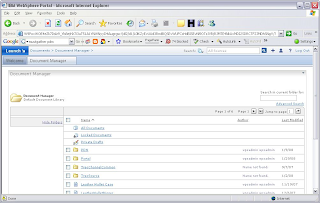
You might notice that pdm portlet (Portal Document Library ) might not function properly after upgrading to WPS 6.1.0.2 WP_PTF_6012 (IBM WebSphere Portal, Version 6.0.1.2 Fix Pack)or WCM 6.1.0.2 (WCM_PTF_6012 (Web Content Management, Version 6.0.1.2 Fix Pack), symptoms include,

1) PDM portlet will be unresponsive when you click on any of the folder strcuture and trying to navigate through it as show below.


2) The left navigation file tree view of the pdm portlet will be empty.

3) you may not able to browse the document libraries from the WCM portlet when trying to refer a document component from WCM Authoring portlet.
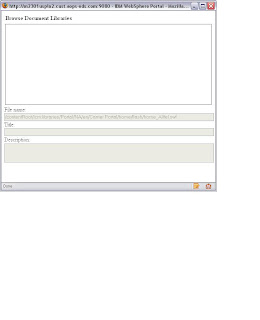

In order to fix the problem goto the WebSphere Adminconsole (Dmgr or AppServer)and do the following,

When the Document Manager Web module is redeployed, its groups must be mapped to the All Authenticated group in WebSphere. To map the groups, follow these steps:

Select the Document Manager application, as follows:
Expand Applications.
Select Enterprise Applications.
Locate the application that starts with Document Manager.
Click Map Security Roles to Users/Groups.
Assign the Authenticated role to the All Authenticated group.
Save your changes.
Restart the portal or sync the nodes and restart the portal cluster.